Give yourself more help. Help yourself give more.

Every account.One honest picture.

Your household's banks, cards and a year of history in one private, read-only view: where the money goes, a plan you agree on, and a short email every morning. It runs on your own site, and your data is never sold or shared.
Read-only
daily bank sync
12–14 mo
of history from day one
0
ads, trackers or data sales
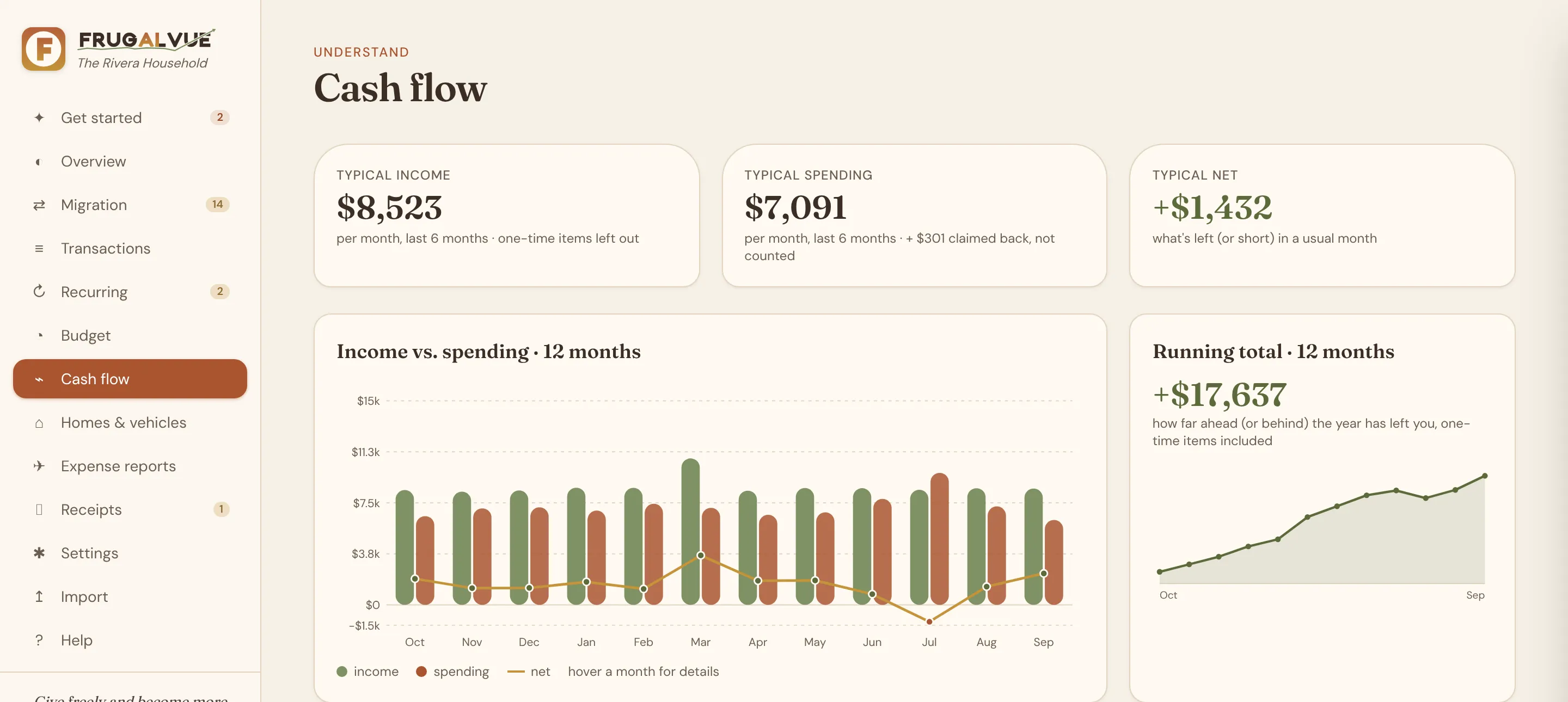
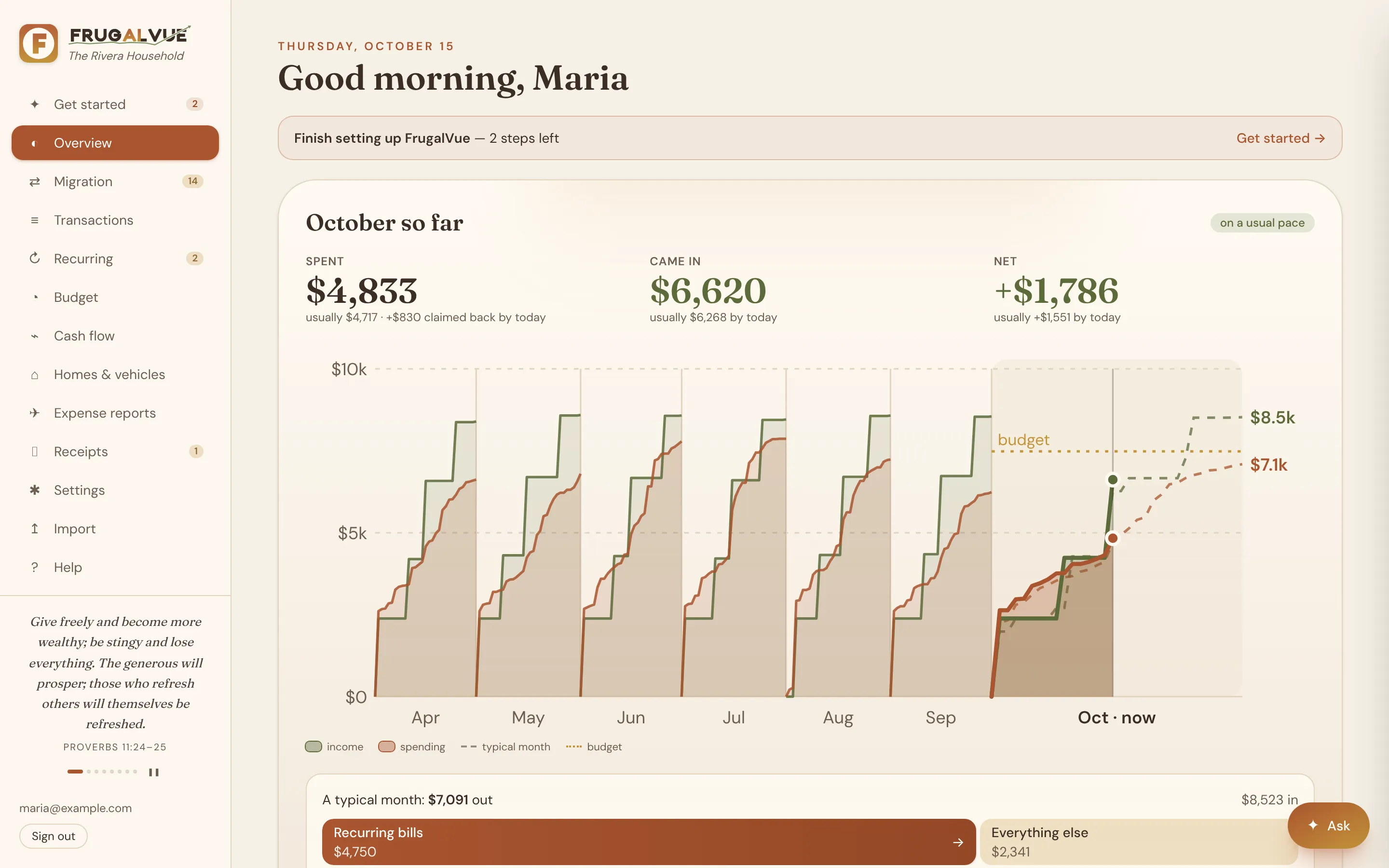
FrugalVue overview: this month's spending against the budget, upcoming bills and recent activity for a demo household
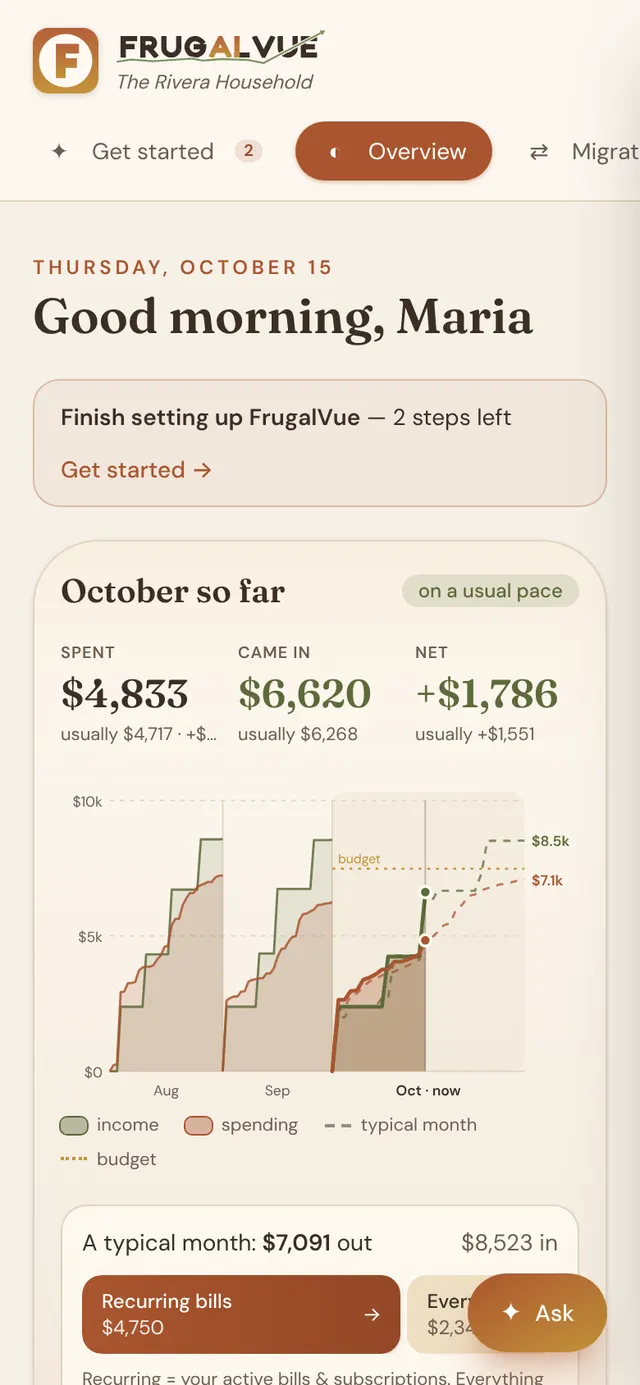
The same overview on a phone

Privacy first

Your money data stays yours

Most budgeting apps keep every household's data in one shared cloud. FrugalVue gives each household its own.

Read-only, by design

Banks connect through SimpleFIN Bridge, on its own site. FrugalVue reads balances and transactions. It can't move money and never sees a bank password, and you can revoke access in one click.

Your own private site

Each household gets its own site and its own database, not a shared pool. Only the people the owner adds can sign in, checked on the server for every request.

Never sold or shared

No ads, affiliate offers, trackers or analytics. Your data isn't sold, shared or used to market to you. AI stays off unless you add your own key, and you can export everything any time.

Every layer, in detail

Sign-in

  • Google sign-in with a verified email
  • Deny by default: only people the owner added
  • Checked on the server for every page and request

Banks

  • Read-only through SimpleFIN Bridge: it can't move money
  • No bank passwords, ever
  • Revoke access at SimpleFIN in one click

Secrets

  • Bank, email and AI keys encrypted at rest (AES-256-GCM)
  • Backups lock secrets with your own passphrase
  • Nothing secret is shown back on screen

Your data

  • Account numbers kept as the last 4 digits only
  • Imported files are read in memory, never stored
  • Changes written to an audit log; export any time

AI (optional)

  • Bring your own key, or leave it off entirely
  • Only what a question needs is sent
  • Category suggestions send payee names only

The app

  • HTTPS only, strict security headers
  • No third-party scripts, ads or analytics
  • Not indexed by search engines

What it does

Everything a household needs, nothing it doesn't

Built for a household that wants to see clearly and decide together. New marks what arrived in the latest releases; see what's new.
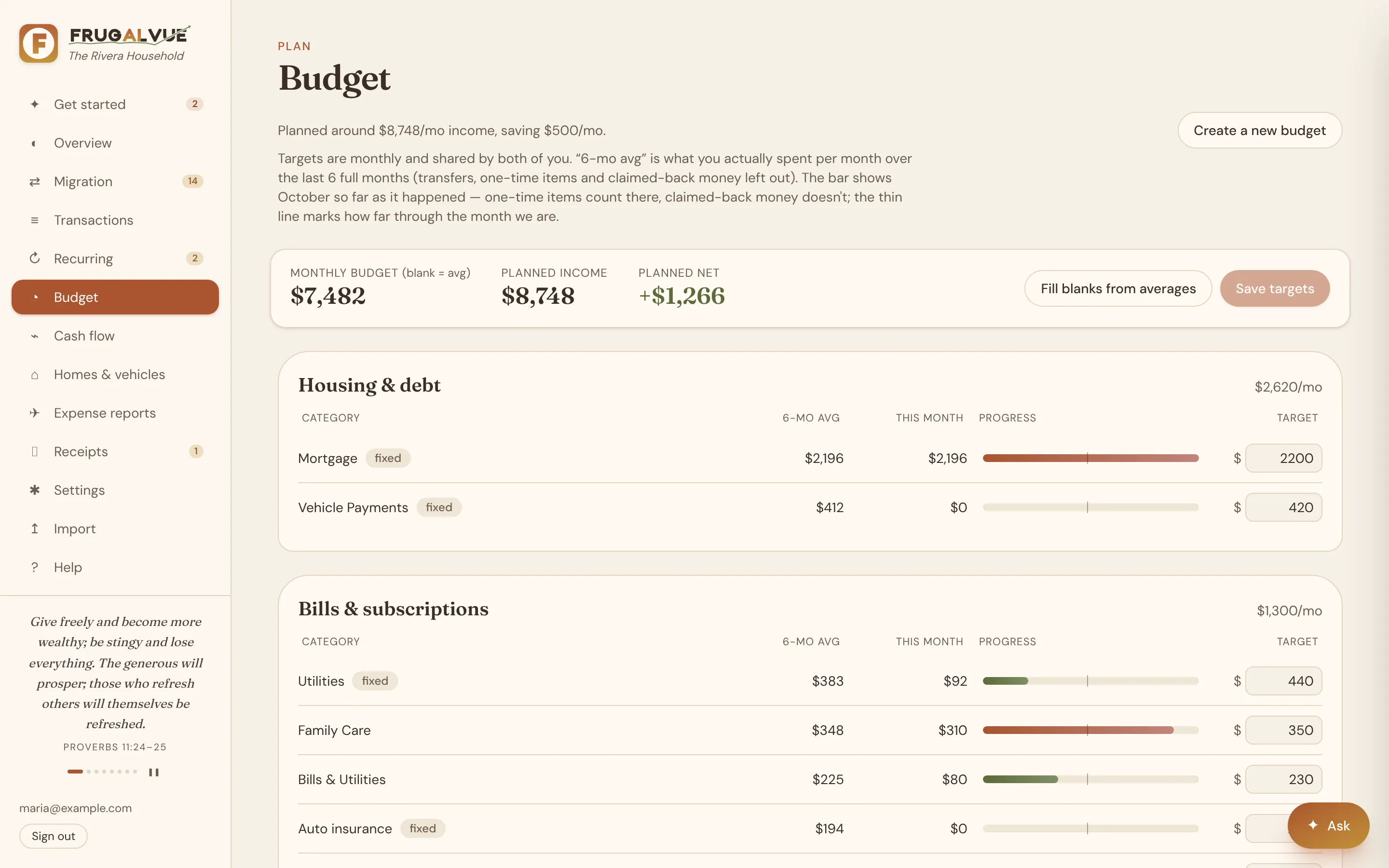
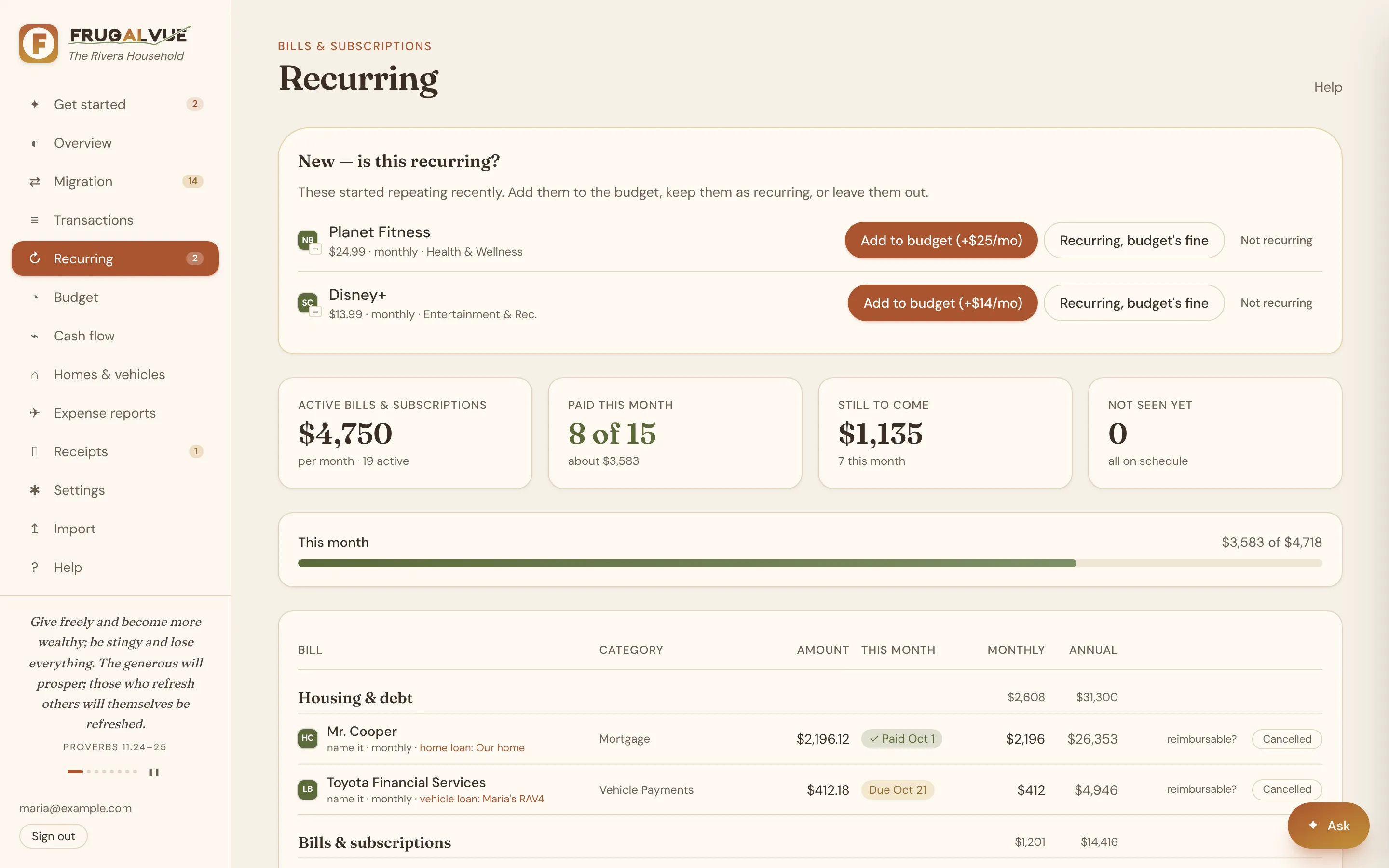
Track

  • Daily read-only bank sync, with how fresh each balance is
  • 12–14 months of history on day one, from Rocket Money or any bank's download
  • One ledger: a purchase seen by the bank, the card and a file counts once
  • Recurring bills and subscriptions found for you, yearly ones too
  • The money calendar: this month's bills and paychecks, paid or still to come, at a glance New
  • Nicknames for bills, and cancelled ones kept out of savings ideas New
  • Payee names: one store, one name, however the bank spells it New
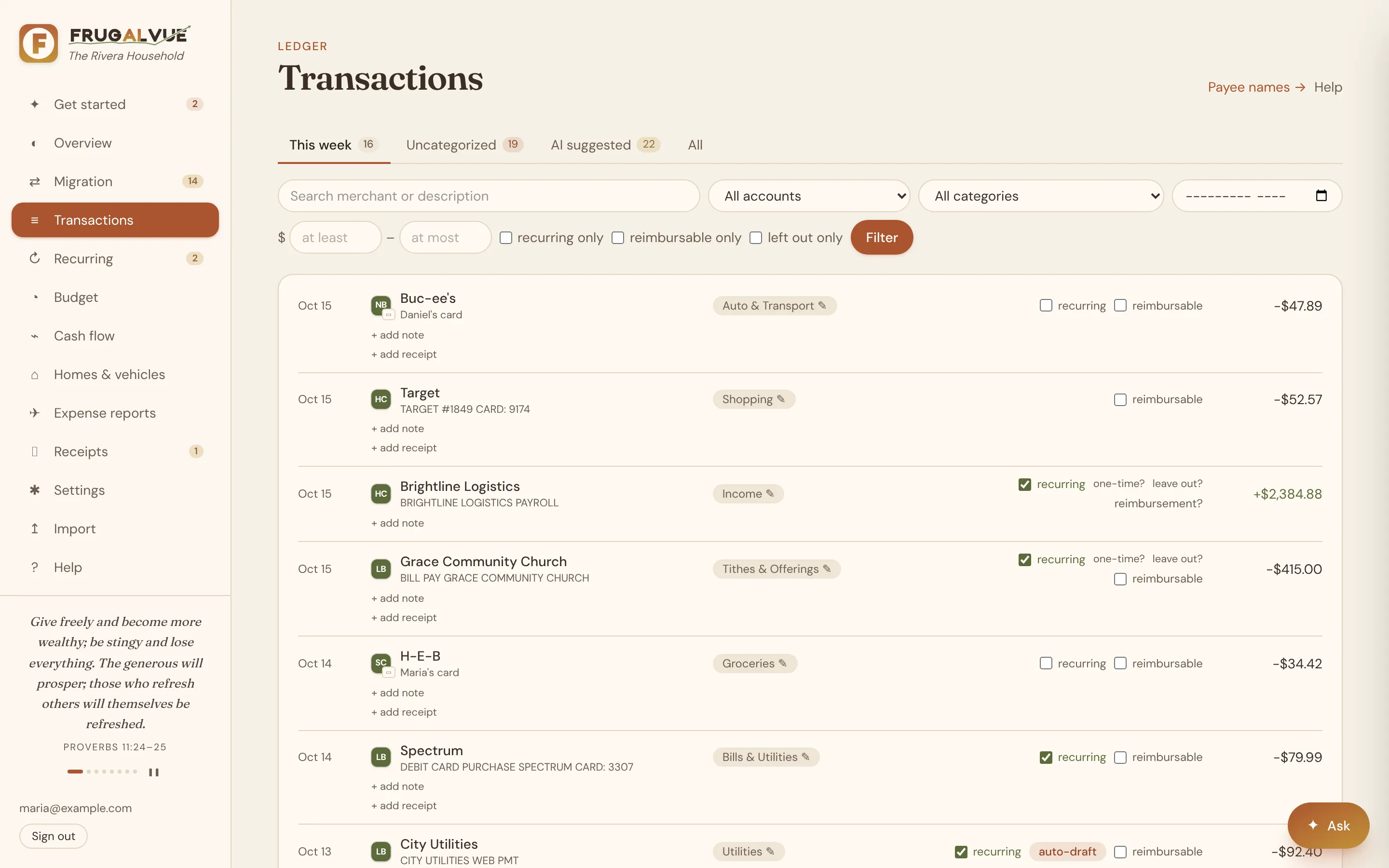
  • Transactions by this week, uncategorized and AI-suggested New

Plan

  • A first budget built by a wizard from what you really spent
  • Giving planned first, as a share of income
  • Monthly cash flow with averages, and what your home really costs
  • Leave one-time money, like a house sale, out of every figure New
  • Homes, vehicles and loans, with what's still owed New
  • Payoff planner: slide an extra payment, see the months and interest saved New

Together

  • Everyone signs in with their own Google account
  • A morning email: yesterday's spending, the month against budget, bills due
  • Account Migration Wizard: switch banks without missing a bill
  • Receipts and expense reports, tracked until you're paid back New
  • Receipts from your email, matched and filed by Claude (with your email connected) New
  • Ask questions with your own Gemini, Claude or OpenAI key (optional)
  • Connect Claude to your FrugalVue, read-only or read & write (preview) New
  • Help built in, and a full backup any time New
  • Three looks, each person's own: Natural, Tech or Bright (try them at the top of this page)

Screens from a demo household. Every figure is made up.

What's new

Fresh from the latest update

See everything new

How it compares

FrugalVue, Rocket Money, Monarch and YNAB

Privacy first, then features and price. Each of the others is a good app with strengths of its own, listed honestly below.

Swipe the table sideways to see all four →

From each company's published pages, checked October 15, 2026. Prices and features change, so check their sites. "Not found" means we didn't find it there.
FrugalVueRocket MoneyMonarchYNAB
Privacy
Where your data livesYour household's own site and databaseThe company's cloudThe company's cloudThe company's cloud
Selling and sharingNever sold or shared; no ads or trackersSays it takes no payment for your data; its privacy notice lists sharing with Rocket companies for marketing (you can limit it) and for joint marketing with other financial companies (you can't)RMSays it never sells your financial data; what it shares with ad partners may count as "sale or sharing" under some state lawsMOSays it doesn't sell or share your budget data; runs targeted ads to find new usersYN
How it's paid forThe household's own plan; no ads, offers or commissionsFree tier, Premium and Premium+ subscriptions, and sponsored offersSubscriptions onlySubscriptions, plus books and merchandise
Bank connectionSimpleFIN Bridge, read-only; can't move moneyPlaid (Akoya for Fidelity), read-only for tracking; Financial Goals moves money if you turn it onPlaid, Finicity, MX or Spinwheel, read-onlyPlaid or MX, read-only (Plaid in the UK and EU)
Run it on your own hostingYes, or we host it for youNot foundNot foundNot found
Export your dataFull backup any timeCSVCSVCSV
Features
BudgetsBuilt from your real spending, giving firstUp to 2 custom category budgets free; more with PremiumFlex or per-categoryZero-based, its signature method
Recurring bills found for youIncluding yearly onesYesYes, with a bill calendarScheduled by hand
Household membersEveryone the owner addsOne partner, view-only, with PremiumMembers at no extra costUp to 6 people at no extra cost
Import past history from filesRocket Money export, CSV, OFX, QIFApple Card statements onlyCSV (web)CSV, OFX, QFX, QIF (web)
Switch banks without missing a billAccount Migration WizardNot foundNot foundNot found
Receipts on transactionsYes, and from your email with ClaudeNot foundYesPhotos on transactions
Expense reports and reimbursementsYes, tracked until paid backNot foundBusiness income and expense tracking (Plus); no reimbursements foundNot found
Loan payoff planningPayoff planner tied to your billsNot foundPayoff calculator and goalsLoan Planner
Investments and net worthBalances and loans; no investment trackingNet worth (Premium)Detailed investment trackingNet worth report; investments by hand
Credit scoreNot offeredYesYesNot found
Cancels subscriptions and negotiates bills for youNot offeredYes: cancels subscriptions with Premium; from Nov 2, 2026, negotiates bills with Premium+ only, with no fee (before then, a share of the savings)Not foundNot found
AIOptional, with your own keyRowan assistant (Premium+)AI assistant; AI categories always onAI categories and spending insights; no assistant found
Connect Claude to your dataYes (preview)Not foundConnector pausedPublic API; no official connector (its privacy policy mentions YNAB apps in AI chatbots)
AppsWeb, made for phones too; no app-store appWeb, iOS and AndroidWeb, iOS and AndroidWeb, iOS, Android and Apple Watch
Price
CostInvite-only early access; we'll talk costs when we reply. SimpleFIN Bridge has its own small yearly feeFree tier; Premium is pay-what-you-think-is-fair, about $7–14 a month; Premium+ $15 a month$14.99 a month or $99.99 a year; Plus $199 a year; no free tier$14.99 a month or $109 a year
Free trialThe demo site, for as long as you like7 days7 days34 days

Where FrugalVue is strong

  • Your data on your own site, never sold or shared
  • A year of history on day one, and switching banks without missing a bill
  • Giving planned first, expense reports, receipts and loan payoff plans in one place
  • Everyone in the house, at no cost per person

Where it falls short

  • No app-store app: it runs in the browser, phones included
  • No investment tracking or credit score
  • Nobody cancels subscriptions or negotiates bills for you
  • US banks that SimpleFIN Bridge supports; small team, early access

Another app may suit you better if…

  • You want a free tier and someone to cancel and negotiate for you: Rocket Money
  • You track investments closely and want polished mobile apps: Monarch
  • You want to learn zero-based budgeting, with lots of free teaching, or you bank in the UK or EU: YNAB

Sources, as published by each company (checked October 15, 2026). FrugalVue isn't affiliated with Rocket Money, Monarch or YNAB; their names are their owners' trademarks.

  1. Rocket Money: security, privacy notice, terms, FAQ, pricing, bill negotiation, account sharing, export
  2. Monarch: pricing, Plus, privacy, data providers, members, import, MCP connector
  3. YNAB: pricing, security, privacy policy, state privacy notice, Direct Import, YNAB Together, Loan Planner

Watch

See it in action

A short tour with a demo household. Every name, bank and number in it is made up.

A tour of FrugalVue2:58 · the ideas, the screens and the settings

How it works

Bring your history, then let it run

Set up in an afternoon. After that, it runs by itself every morning, and you can keep your current app alongside it for as long as you like.

  1. 01

    Seed your history

    Import 12–14 months: a full Rocket Money export (categories and renamed merchants included), or each bank's CSV, OFX or QIF download. You see a preview before anything is saved.

  2. 02

    Connect read-only

    Link your banks once through SimpleFIN Bridge. It picks up the same accounts where the files end and syncs daily; overlaps are matched, never doubled.

  3. 03

    Review and plan

    Give your common payees a category (your AI can suggest them), say whose card is whose, and build a budget from real spending.

  4. 04

    Stay on track

    A short email each morning, a shared bill tracker and an honest monthly cash flow keep everyone pointed the same way.

Rocket Money export Any bank or card CSV OFX · QFX · QBO QIF Mint, Monarch & YNAB-style CSVs Daily sync via SimpleFIN Bridge

How it fits together

Your banks in, one clear picture out

SimpleFIN Bridge brings in the accounts you choose, read-only. FrugalVue lines up every source, so you can track, manage and reconcile across all of them. AI helps where you want it, and only with your own key.

How FrugalVue fits togetherYour banks and cards reach FrugalVue read-only through SimpleFIN Bridge, alongside history files and receipts. Inside your own FrugalVue, on your own hosting and database, where nothing is sold or shared, everything is collected and de-duplicated, organized into categories, tracked against budgets, bills, cash flow and loans, and reconciled through expense reports and reimbursements. Your household uses it through the app and a morning email. An optional AI with your own key suggests categories, reads receipts and answers questions; Claude can connect over MCP with a personal key, as a research preview.Your moneyYour FrugalVueYou & your AIYour hosting · your database · never sold or sharedRuns by itself every morning: sync, match receipts, email1 · CollectEvery source matched to the same accountsDuplicates merged, transfers paired:nothing counted twice2 · OrganizeCategories and payee rulesAI suggestions marked until you check themOne-time and left-out items, cards byperson3 · TrackBudgets, recurring and annual billsCash flow, balances, loans and payoff plansSwitching banks, bill by bill4 · ReconcileExpense reports with receiptsPaid back by a deposit, an HSA or otherWhat's still owed, across every accountBanks & cardsChecking, savings and credit cardsat any bank SimpleFIN reachesSimpleFIN BridgeRead-only. You pick the accountsNo bank passwords in FrugalVueRevoke any timeHistory files12–14 months to start: RocketMoney export, any bank's CSV, OFXor QIFReceiptsPhotos and PDFs, uploaded ordropped in the inboxread-onlydaily syncimportattachYour householdGoogle sign-in, invited peopleonlyThe app on phone or desktopA short email every morningYour AI (optional)Your own key: Gemini, Claude orOpenAISuggests categories, readsreceiptsAnswers questions with read-onlylookupsClaude via MCPResearch previewclaude.ai, the Claude apps andClaude Code: sign in, or use apersonal keyAsk, categorize, build expensereportssee · decide · fixsuggestions & answerstools · sign-in or key How FrugalVue fits togetherYour banks and cards reach FrugalVue read-only through SimpleFIN Bridge, alongside history files and receipts. Inside your own FrugalVue, on your own hosting and database, where nothing is sold or shared, everything is collected and de-duplicated, organized into categories, tracked against budgets, bills, cash flow and loans, and reconciled through expense reports and reimbursements. Your household uses it through the app and a morning email. An optional AI with your own key suggests categories, reads receipts and answers questions; Claude can connect over MCP with a personal key, as a research preview.Your moneyBanks & cardsChecking, savings and credit cards at anybank SimpleFIN reachesSimpleFIN BridgeRead-only. You pick the accountsNo bank passwords in FrugalVueRevoke any timeHistory files12–14 months to start: Rocket Money export,any bank's CSV, OFX or QIFReceiptsPhotos and PDFs, uploaded or dropped in theinboxread-onlyYour FrugalVuesync · import · attachYour hosting · your database · never soldRuns by itself every morning1 · CollectEvery source matched to the sameaccountsDuplicates merged, transfers paired:nothing counted twice2 · OrganizeCategories and payee rulesAI suggestions marked until you checkthemOne-time and left-out items, cards byperson3 · TrackBudgets, recurring and annual billsCash flow, balances, loans and payoffplansSwitching banks, bill by bill4 · ReconcileExpense reports with receiptsPaid back by a deposit, an HSA or otherWhat's still owed, across every accountuse · ask · connectYou & your AIYour householdGoogle sign-in, invited people onlyThe app on phone or desktopA short email every morningYour AI (optional)Your own key: Gemini, Claude or OpenAISuggests categories, reads receiptsAnswers questions with read-only lookupsClaude via MCPResearch previewclaude.ai, the Claude apps and Claude Code:sign in, or use a personal keyAsk, categorize, build expense reports
runs today research preview Bank access is read-only: nothing here can move money.

Invite-only early access

Join early access

Each household gets its own private FrugalVue: its own site, its own database, and only the people you invite. Tell us a little about your household, and we'll reply by email to talk through setup.

  • Want to look around first? Ask for a login to the demo: a made-up household you can click through
  • We'll help you seed 12–14 months of history
  • Set up for you, or on your own hosting
  • No obligation; we reply personally

Prefer email? Write to info@frugalvue.com.

What would you like?
Please don't include account numbers or balances. We use your details only to reply. Privacy

Questions

Good to know

Can I try it first?

Yes. Choose "a login to the demo site" on the form and we'll add you to demo.frugalvue.com: a made-up household with a year of history, a bank switch in progress, loans to plan and expense reports. Click anything; it resets every night.

Can FrugalVue move money or pay bills?

No. It only reads balances and transactions, through a read-only connection. It can't move money, and it never sees your bank passwords: you connect your banks on SimpleFIN Bridge's own site.

Which banks work?

For the daily sync, any bank or card that SimpleFIN Bridge supports, which covers most US banks and credit unions; you can check yours on their site. For history, any bank that lets you download transactions as CSV, OFX/QFX/QBO or QIF, plus Rocket Money's export.

Why 12–14 months of history?

A bank connection usually starts with about the last 90 days. A full year shows the bills that come once or twice a year, seasonal spending, and a fair average to build your first budget from. The overlap between your files and the bank connection is matched, so nothing counts twice.

Where does my data live?

In your household's own FrugalVue: its own site and its own database, not a shared pool. Account numbers are kept as the last 4 digits, secrets are encrypted, and you can export a full backup at any time.

Do I need AI?

No. FrugalVue works fully without it. If you add your own Gemini, Claude or OpenAI key, you can ask questions about your money and get category suggestions; only what each question needs is sent to the provider you chose.

What does it cost?

FrugalVue is in invite-only early access, and we'll talk through costs when we reply. SimpleFIN Bridge, which provides the daily bank connection, is a separate service with its own small yearly subscription.

Is this financial advice?

No. FrugalVue organizes, categorizes and reports. It's a read-only visual aid; check important figures against your statements, and talk to a professional for advice.